April 3, 2020 - WFH (working from home) day # 8,489.
My wife and I each wear many hats in the operation our small business! Today I'm studio photographer and website wizard, therefore my hat of choice this morning was a silver Alewife hat.

Having been a clown in a past life, unusual hat wearing is not new to me and I keep a small collection handy for when my head gets cold.
The other day my wife and I took a long walk through our small town and I got a lot of strange looks, I had forgotten that I was wearing my green Alewives hat from the Ren Fest.
My current task is to photograph and put on our website some of the most beautiful of our inventory that had been intended for the now cancelled Scarborough Renaissance Festival in Waxahachie, TX.
Unhappy with the beige background afforded by our dining room wall, I quickly built a small (16x16x16 inch) portable light box out of white corrugated plastic and white duct tape and then pointed two LED floodlights in from the front. The white walls of the light box bounced the light around quite well, preventing too many distracting shadows on the product.
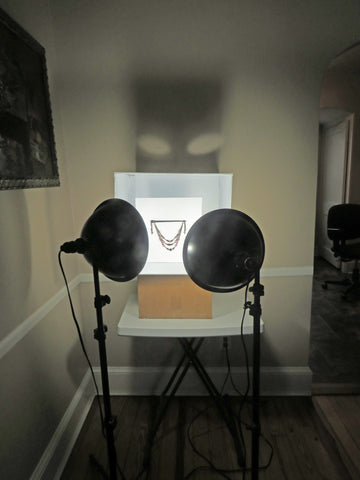
If you're wondering about the cardboard box "booster seat" under the lightbox, it helped to bring everything up to a comfortable height for me to work with my camera which is an iPhone X in Portrait mode with Studio Lighting selected (for most photos).
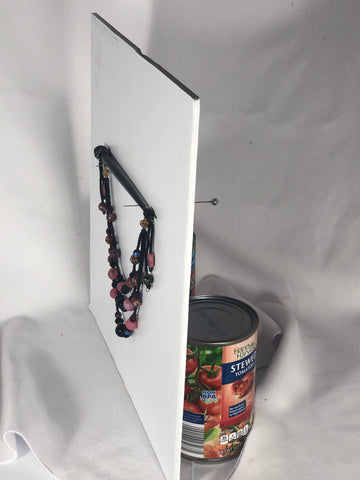
Another breakthrough idea for this photo shoot was a new way of hanging small objects from a background, by sticking a couple of long corsage pins through foam core leaning against two cans of stewed tomatoes!
As I photographed objects of increasing size I found the need to build a larger box that was 24 inches tall, 24 wide and 18 deep. For the smaller hats this worked great, but I ultimately had to remove the top so that I could shoot down from above.

Luckily I had scored these awesome adjustable light stands years ago at the nearby weekly auction in Crumpton, MD! I used 2 Bright White LED floodlight bulbs listed at 5000k and 1325 lumens. Experimentation with lamp height and distance away from the object yielded some awesome results! 
Below is one of the lightweight Sinamay Soleil hats we just made available for sale.

Please have a look at our new Buy it Now Collection on our Home Page to see the spectacular results of the continuing photo shoots. More products will be added as time allows!
Thanks!
I love your arts! I’m so sorry you’re not creating marionettes anymore. After seeing 2 goats once at the MD Renn Fest, I’ve dreamed of ordering a donkey colt with Mediterranean markings from you to celebrate Palm Sunday every year.
Karen
Leave a comment